Seolon Diary KR App Store

iPad · Apple Pencil

Seolon Diary

A warm paper diary for iPad and Apple Pencil

  • Write it once — your yearly, monthly, weekly, daily pages and to-dos all stay in step
  • Apple and Google Calendar events, synced both ways in real time
  • A 14-day free trial with no auto-renewal, then one purchase for the year edition
Download on the App Store

iPad only · 14-day free trial
No auto-renewal

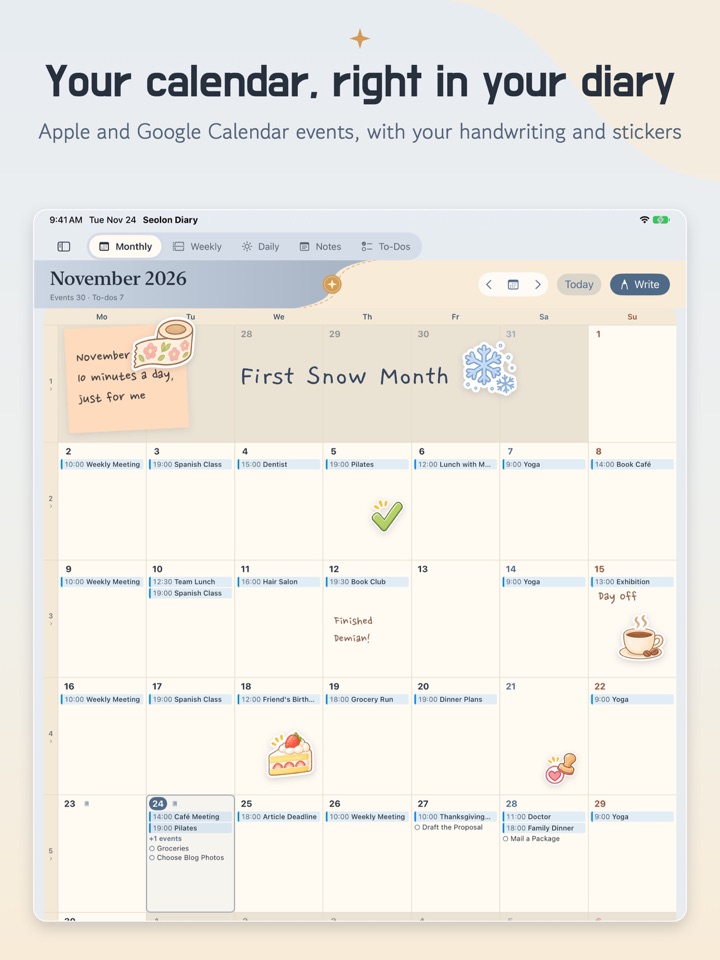
A monthly page showing Apple and Google Calendar events in Seolon Diary
Features

The ease of paper,
the connections of digital

Only what a diary you reach for every day actually needs.

Calendar & to-do sync

Apple and Google events from your iPad calendars appear on the yearly, monthly, weekly and daily pages. Events you add in the diary are saved to your calendar, and a to-do written once shows on every page. Change the date and the monthly, weekly and daily pages all follow.

Handwriting that feels like paper

Ballpoint, fountain pen, pencil and highlighter, plus a ruler. Keep the pens you like in a pencil case and switch in a tap, and zoom in to write neatly in portrait or landscape.

Journal, reading, culture, habits

A page of journal a day with photos and handwriting, a bookshelf that grows with reviews, a culture log of posters and ratings, habits that count the days you keep going, plus a bucket list and projects.

370 stickers & workshops

370 ready-made stickers, your own stickers drawn in the Sticker Workshop, and page templates designed in the Page Workshop. Twenty covers and your own cover words, too.

No servers, no ads, no sign-up

Your records are stored only on your iPad. No account, no server, no ads. Keep a backup file with “Backup & Restore Records” in Settings and save it to the Files app.

How it works

One diary a year —
the only thing you buy is that diary

Use every feature free for 14 days, and if it suits you, buy that year's diary once.

  1. 01

    14-day free trial

    It starts the moment you open the app. It's a $0 item, so nothing is charged, and nothing is charged automatically when the trial ends.

  2. 02

    One purchase for the year

    Buy the diary for the year you want to use once and keep using it. It isn't a monthly subscription.

  3. 03

    What you wrote stays yours

    Even without buying, you can always view and export what you've written. Only new writing stops.

14-day free trial (no auto-renewal) · One-time purchase per year edition

FAQ

Frequently asked questions

  • How does the free trial work?

    Open the app and you can start a 14-day free trial. It's a $0 item, so nothing is charged, and nothing is charged automatically when the trial ends.

  • What am I buying?

    You buy one year of the diary (a year edition) once, and that diary keeps working. It isn't a subscription.

  • Will my records disappear if I don't buy?

    No. Even after the trial ends, you can always view and export what you've written. Only new writing stops.

  • What if I change devices or delete the app?

    Your records are stored only on your iPad. Go to Settings → Backup & Restore Records → “Export backup file” and save it to the Files app, then use “Import backup file” on the new device.

  • My purchase isn't showing up.

    Go to Settings → Purchase → “Restore purchases”. Make sure you're signed in with the same Apple ID.

  • How do I start the trial or buy a diary?

    Go to Settings → Purchase → “Buy diary · Free trial” to buy the year edition of the diary you have open. You can also pick a diary in My Diary Shelf and tap “Buy”.

  • Can I see my Google Calendar events?

    Yes. Add your Google account in iPad Settings → Calendar → Accounts and its events appear in the diary. Events you add in the diary are saved to the calendar you choose.

  • How do I move a to-do to another day?

    On the daily page, swipe a to-do to see “Tomorrow · This month · Pick a date”. On the monthly page you can also drag a to-do onto another date. Move it and the monthly, weekly and daily pages change together.

Support

Stuck on something? Tell us.

Installing, buying, backups, syncing — email us and we'll look into it and write back.

nuyiwa@gmail.com